Why a desk device
CO₂ rises slowly in a closed room. By the time you notice a heavy head or lost focus, the air has been stale for a while. DeskMate Air sits next to the keyboard and makes that invisible number visible: at a glance, with colour, and with a reminder when it is time to open the window.
What it does
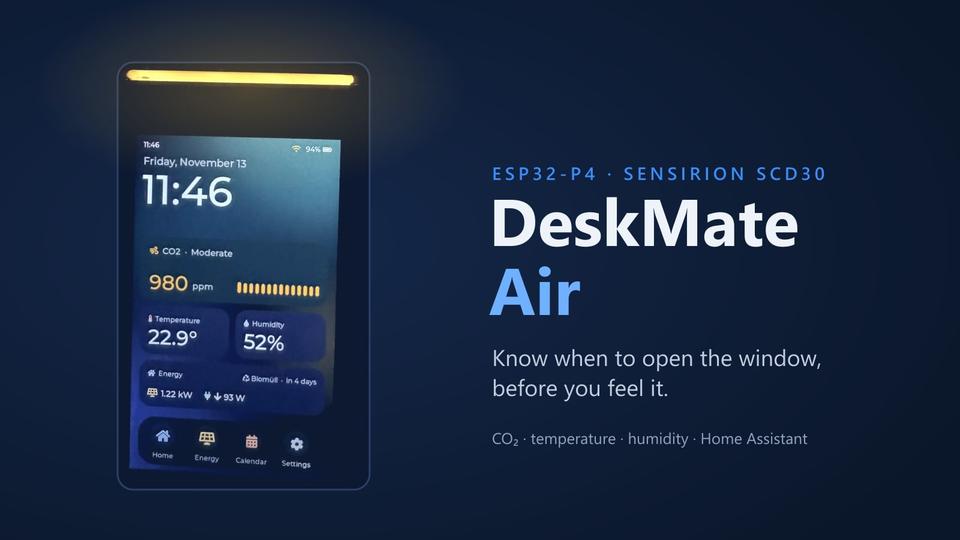
The home screen made to look like a phone launcher: clock, CO₂, temperature and humidity widgets, an energy and trash-pickup card, and a dock with Home, Energy, Calendar and Settings. The Air page shows the current CO₂ level as a ring and charts CO₂, temperature and humidity over 15 minutes, 1 hour, 12 hours, 1 day or 7 days, read from the daily logs on the microSD card. Short gaps are bridged so the charts stay readable.
When the air gets worse, DeskMate Air speaks up, gently at first and then more often: every 30 minutes from 1200 ppm, up to every minute above 2000 ppm. Quiet hours keep it silent at night. When the screen is off, the LED light bar keeps showing the CO₂ colour, and blinks on the day before trash pickup.
Calibration on the device
Temperature offset, a guided fresh-air recalibration (FRC), automatic self-calibration (ASC) and altitude compensation are all available from the Settings screen. No laptop, no serial console.
Part of the smart home
Over MQTT with auto-discovery, the device appears in Home Assistant with CO₂, temperature, humidity and battery sensors. It also works the other way round: Home Assistant sends solar production, grid use, home-battery state, calendar events and trash pickup days to the device.
Built to be mobile
A LiPo cell makes it easy to carry from room to room. The firmware watches the charge level, detects charging and puts the device into protective deep sleep before the cell runs too low.
What’s next
The next generation swaps the colour screen for e-paper on an ESP32-S3 and moves to a Sensirion SCD41, possibly with an SGP41 for VOC and NOx: longer battery life, a smaller footprint, same idea.